AI Video Tip #1 - Not all frames are equal!
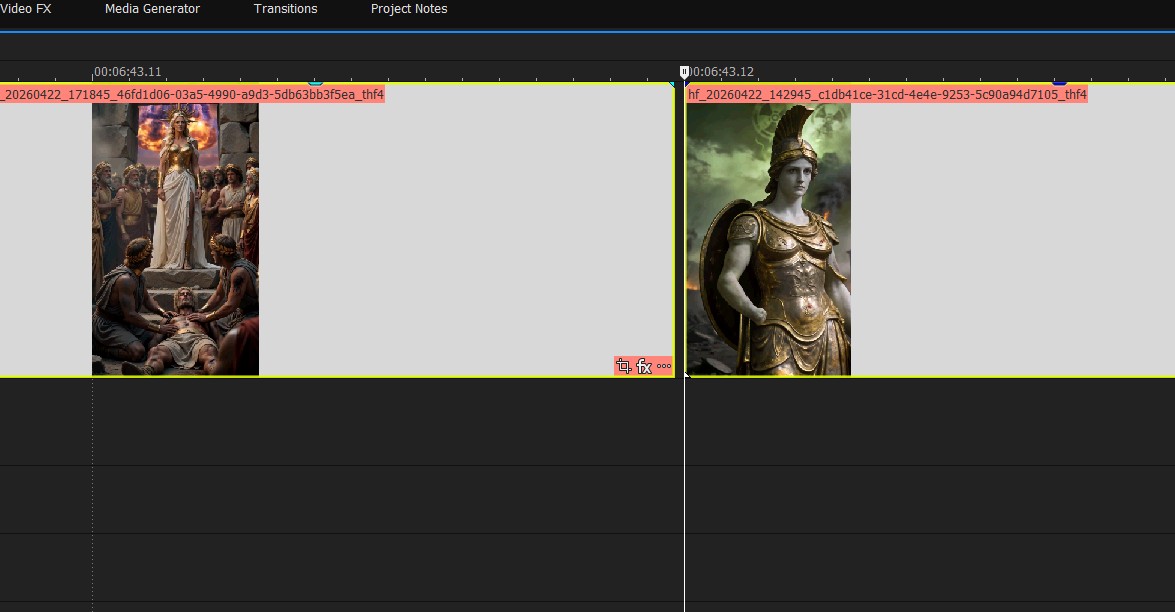
This might come as a surprise to some people… but not all frames in a given video clip are of equal length. Most times, your last frame is going to be slightly shorter than the rest, as in the main image.
To be clear, you’re looking at the ultra-zoomed in view between two clips in an editing timeline. They both start exactly on a frame (the first clip’s start position is not visible due to being zoomed in). You can see the second clip start at frame 12, yet it is also evident that the last frame of the first clip (from frame 11-12) is not as long as it should be. It’s a bit short.
What does this mean? It means you should probably snip off the last frame so that the next clip lines up exactly. If not, there could be a “blended or mixed frame” when the video renders, which (if you get distributed) may get your film kicked back to you during the QC process. This is something you definitely want to avoid.
It’s also not uncommon for the “gap” to be more significant than in the example image. I’ve seen it where the incomplete frame is 10% of it’s intended size, leaving a 90% gap. In those cases, there is definitely a visible “skip” or extra frame of black that you can see. Again, this is something you really want to avoid.
Ideally, you want to “cut on the action”, meaning that you should cut a clip while movement is already taking place. If you’re waiting for the actor to “react”, even by a split second, it will look unnatural. In theory this means that most or all of your generated clips will be cut at the start and end anyway, but just in case…